A friendly guide to using AI with confidence and keeping what matters private, whichever tool you use.
We wrote it for board directors and non-executives. The steps work for anyone who wants to use AI safely.
Read why and how below. Then follow the one-page set-up guide for the tool you use, with a short film that walks through the same steps. Prepared by Ginny Lavers, Transformation Director, Steadman.
Why it is worth your time
Three reasons to use AI as a director
You read the papers, ask the questions and oversee the company. AI can help in three parts of that job.
In your board work
Do what you already do well quicker and easier, so more of your time goes on judgement and oversight.
In your own development
Build your understanding of AI and your confidence in it hands-on, so you can govern it well in the companies you serve.
In your working week
Less friction in your own working and personal life: diary, email, travel, expenses and follow-up.
How to stay in safe hands
Four principles
1
Ask first
For board work, ask the board which tool is safe to use. For anything else, ask yourself: would the person or company this is about be comfortable seeing me put it into AI?
2
Keep it in the right place
Board material goes only in your board’s approved tool. Keep your own work in your own setup.
3
Share only what’s needed
Give AI only the information and access the task needs and stop your chats being used to improve the AI.
4
Stay in charge
Check what AI gives you, edit it and own it before it goes anywhere. In your settings, make sure it can’t send, share or delete anything without your approval.
See what this looks like in practice
Three ways directors use AI, what to watch for in each and what to do about it.
Board work
What you might do
Prepare for meetings: read the papers, test ideas and assumptions and draft your questions. Keep your own meeting notes and follow up actions.
What to watch
Confidential papers ending up where the company can’t see or control them.
AI note-takers are becoming common and people may not know one is running.
What to do
Use only your board’s approved tool. Don’t download the papers.
Check the company’s rules on AI note-takers and follow them.
Executive development
What you might do
Try AI yourself on everyday, general tasks to see what it does well and where it gets things wrong. Build a personal library of public sources and good questions to ask when your company proposes using AI.
What to watch
Confidential detail or company information creeping into your own AI tools.
What to do
Keep it general: leave out names, figures and company detail.
Save only public sources and your own questions.
Personal productivity
What you might do
Connect AI to your email and diary to sort, draft and schedule, or let it carry out tasks for you, so you spend less time on admin and follow-up.
What to watch
A hidden instruction in an email can trick the tool into acting for someone else.
Anything it can reach is exposed with it. Tools that act for you take real actions you may not see.
What to do
Let it draft and look but not send or delete.
Keep board or company emails in a separate account it can’t reach.
Review what’s connected regularly and keep a log you can read.
Before you use a new AI tool or share information with it, check how trustworthy it is with an expert.
Before you start
Three questions to ask first, for board work
Ask the company secretary, general counsel or chair:
Does the company have an AI policy, with guidance on what can and can’t go into AI tools, and does it cover board directors?
Is there an AI tool the board has approved for board work?
Are the privacy settings already looked after for me, or is there anything I need to set up myself?
We aren’t giving legal advice. Rules vary by company and country, so check with someone who can.
Next · set up your own tool
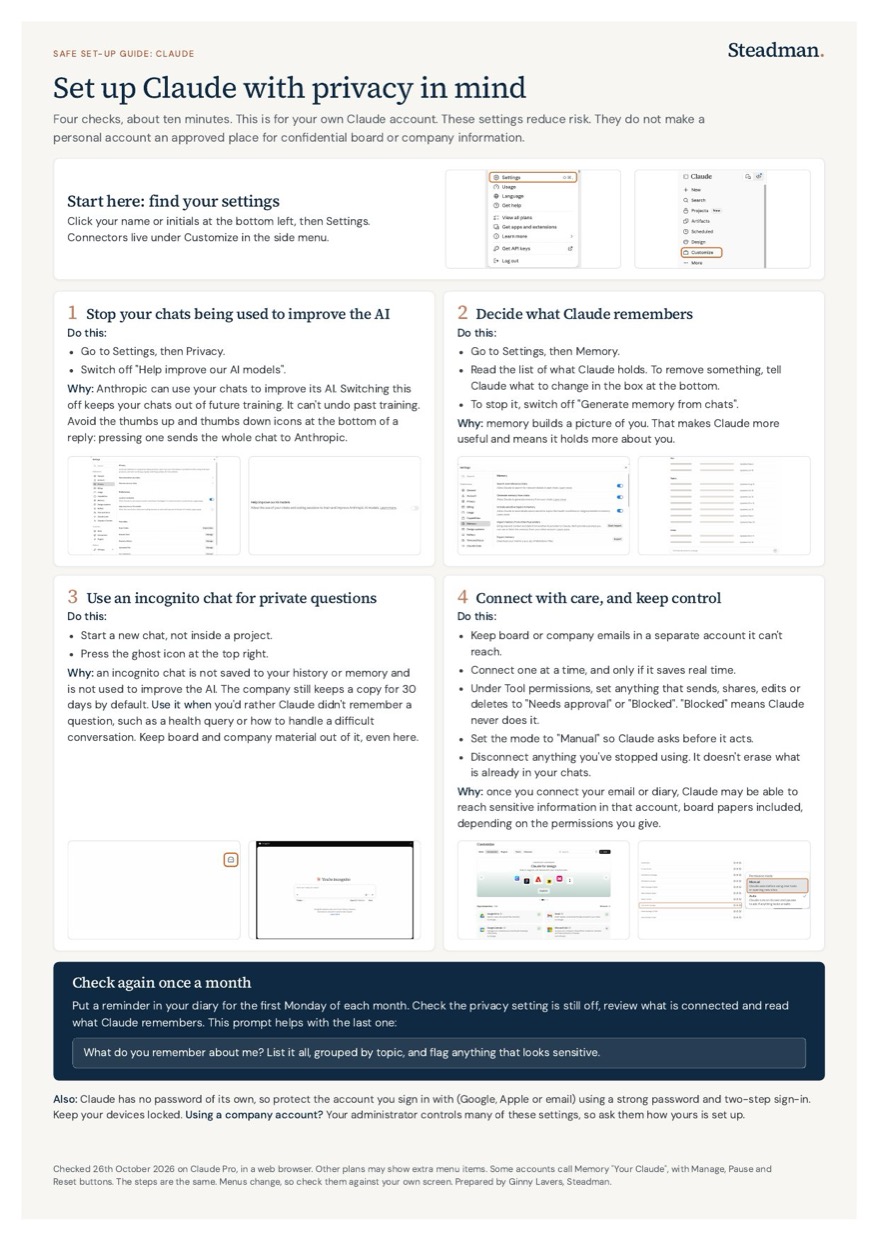
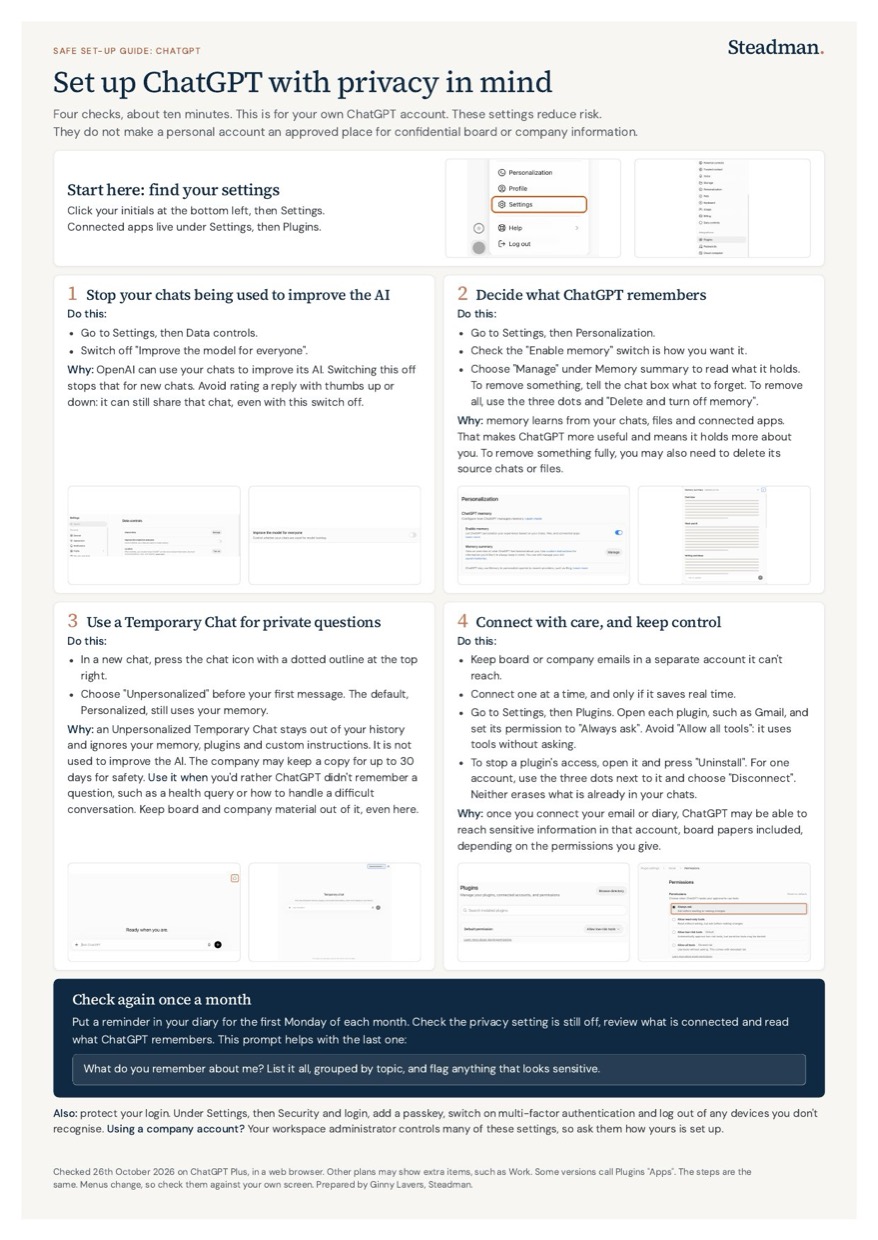
Set up your own AI tool with privacy in mind
For your own use, outside the board’s approved tool. Each guide takes about ten minutes and covers the same four checks: stopping your chats being used to improve the AI, what it remembers, private chats and connected tools.
Safe set-up guide · Claude
Set up Claude with privacy in mind
Four checks, about ten minutes: stop your chats training the AI, decide what Claude remembers, use incognito for private questions, and connect email with care.
The same steps as a film, about three minutes, with sound and subtitles.
The films are narrated by an AI version of the voice of David Boyle, co-founder of Steadman.
Two things to know
We checked the steps on 26th October 2026 on paid personal plans, in a web browser. Menus may look different on other plans and change over time, so check them against your own screen.
These settings reduce risk. They don’t make a personal account an approved place for confidential board or company information.
Want a hand?
For leaders and teams, we run personal and small-group sessions on setting up and using AI day to day. For boards and companies, we advise on AI strategy, tools and ways of working.
If you want help getting started with AI, or further advice on using it safely, email hello@steadman.ai or use the contact page.